
School Alert
When something happens at school, parents shouldn't have to wait for the news. School Alert lets teachers alert parents in seconds and tell them exactly what to do.
Illustrations use a made-up school and town.
How an alert reaches parents
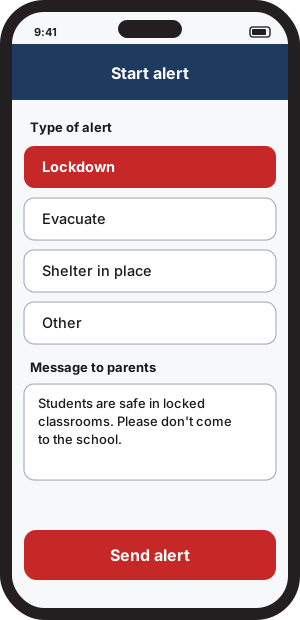
A teacher starts an alert
They pick Lockdown, Evacuate, Shelter in place or Other, and write a short message. One button sends it.
Parents' phones sound
Every parent linked to that school, and parents nearby who chose to hear about it, gets a notification with a distinct chime.
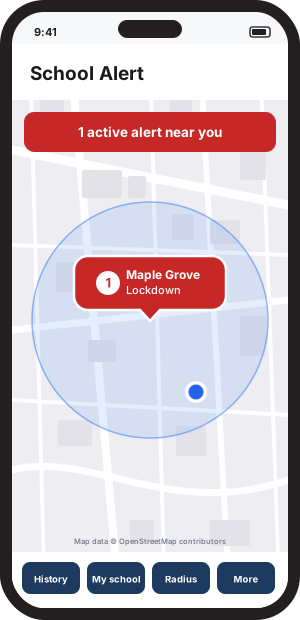
The map turns red
The school's marker shows the alert. Tapping it opens the instructions, with no refreshing needed.
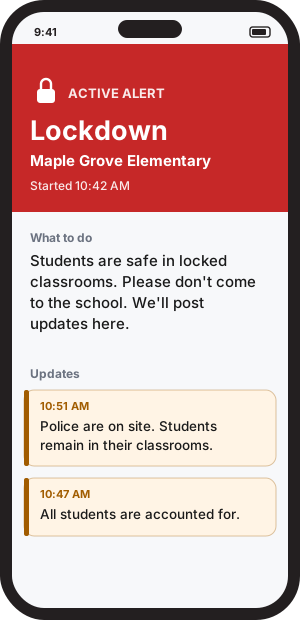
Updates follow until it's over
Teachers send follow-ups as things change, then an all clear when it's safe. Parents see each one right away.
For teachers
- Start an alert in a few taps, even with the keyboard open.
- Send follow-up instructions and an all clear.
- See how many parents each message reached.
- Keep an event log that can't be edited afterward.
- Teacher accounts need an access code, so not just anyone can send an alert.
For parents
- Choose your child's school from every public school in the US.
- Optionally hear about schools within 1, 3, 5 or 10 miles.
- See alerts on a live map, with your own position shown only on your phone.
- Read instructions and updates the moment they're sent.
- Look back at past alerts in your history.
Where it stands
School Alert is a working proof of concept, tested on Android and iPhone. It isn't in the app stores yet. If you're a school or district interested in trying it, get in touch.
School Alert doesn't replace 911 or your school's official emergency procedures. In an emergency, always call 911 and follow instructions from school staff and first responders.